Xiaomi MiMo for Desktop — Beta Access Is Live
Today, the Xiaomi MiMo Desktop Client (hereinafter referred to as MiMo Desktop) has officially opened invitation-based testing with its all-new generation model Preview version.
MiMo Desktop is a desktop AI application designed for real-world work scenarios: it accepts multi-format creatives as input, understands objectives, breaks down tasks, invokes tools, delivers highly usable outputs, and supports real-time preview and modification. We aim to test its limits in long-chain execution, tool invocation, delivery quality and user experience through real tasks, and conduct continuous iterations based on the findings.
Application Link:
After your application is approved, you can also experience two Preview versions of the new-generation Xiaomi MiMo models for free, with limited time and limited quota, during the invitation-only testing period (code name:
MiMo-X-Pro-Preview、MiMo-X-Flash-Preview )。
01 From answering questions to delivering results
Real-world work rarely starts with a clean prompt. Spreadsheets, images, videos, PDFs, audio recordings, and even unextracted Compressed Packets often collectively form the context of a task. MiMo Desktop can directly read these creatives without the need for prior organization or format conversion.
Users only need to state their goals in natural language, and MiMo Desktop will understand the creatives, break down tasks, call tools to execute them, and finally deliver editable outputs: documents, spreadsheets, slides, web pages, images, audio, videos, and even 3D models, apps or software engineering projects.
Example: PPT workflow: Mixed creatives input → Fact and data collation → Narrative structure design → Chart and layout generation → Deliver an editable PPT for further revision
Example: Figma Workflow: Natural language input → Task understanding → Workflow planning → Invoke MCP to control Figma → Generate design elements in real time → Deliver outputs
02 Direct interactive preview interface
The "result preview" of MiMo Desktop is not a static screenshot, but a complete page that incorporates component structure, interaction logic, state changes and data visualization, and supports direct preview and display within the session. What users see is a deliverable that can be clicked, operated and further modified.
When creating lightweight game prototypes, complex data web pages, Office files, and demos requiring dynamic interaction, you can preview the results immediately, ask questions, and continue iterating without setting up a local front-end environment in advance.
3D interactive web page
Prompt: Please create a castle, a Ferris wheel and a carousel with auroras around them. The castle should be able to switch light shows, and the whole thing should be put into an HTML file with a highly aesthetic and premium feel.
Game Design
prompt: Use three. js to develop a SnowRunner-style football game where the protagonist is an off-road truck playing football in the mud, with special actions such as jumping and boosting
Advanced PPT
Prompt: Create a nice-looking PPT introducing Italy, with both pictures and texts, a premium feel, and Italian flair
Graphic and Text Research Report
Prompt: Conduct in-depth research on the history, structural and spatial characteristics of the Huizhou architectural style, and produce a complete research report with a clear, in-depth structure and supporting illustrations.
03 Continue building on the achievements
Delivery is not the end of a conversation. Users can directly select any element, text paragraph, chart, or table area in the conversation or the generated output, and describe the next steps or modification requirements in natural language. The selection defines the scope of action, and MiMo Desktop only processes the part the user wants to modify, eliminating the need to regenerate the complete deliverable or restate the task context.
Every modification is saved in the version history. Users can compare different drafts and roll back to any previous version at any time.
Example: Partial modification in PPT: Select the target area → describe the modification requirements → regenerate the corresponding part in real time
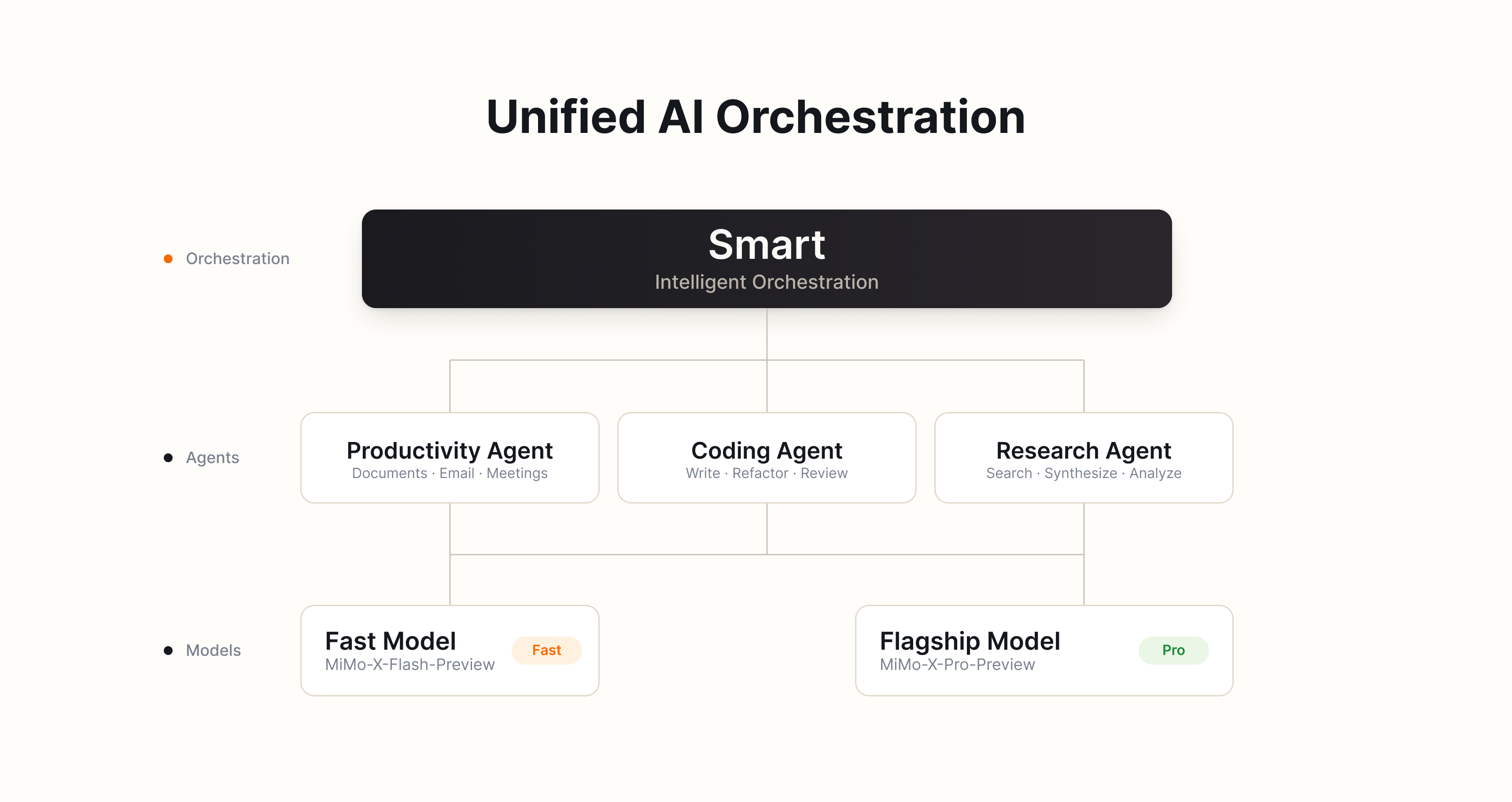
04 Smart Scheduling: Matching appropriate execution paths for tasks
Users do not need to decide which model, Agent, or execution framework to use before starting a task. MiMo Desktop has a built-in "Smart" scheduling mode that automatically evaluates the task type, complexity, delivery requirements and execution cost, and then automatically matches the most suitable execution path for the current task.
-
Task Assessment: Identify whether a task falls into the scenario of office work, programming, research, design, or a hybrid scenario, and determine the required reasoning depth, tool scope and delivery standards.
-
Model Routing: Dynamically select between standard models and flagship models. For daily tasks, standard models are prioritized for their faster speed and lower cost; for complex reasoning, long-chain execution and high-quality delivery, flagship models are adopted for higher output quality. The available model versions are subject to the current release.
-
Harness / Agent / Skill Routing :Select office, code or research Harness/Agent based on the task type; large-scale tasks can be split into multiple Agents responsible for research, planning, execution and review respectively, and different Skills will be automatically invoked during the execution process to expand capabilities and meet delivery quality requirements.
-
Multi-session collaboration: Multi-role session teams can be formed on demand. Multiple sessions can communicate and collaborate with each other, and each session has independent memory, workspace and task status while advancing the project.
"Smart" scheduling maximizes the reduction of users' mental cost, and automatically makes the optimal choice among quality, speed and cost.
05 Browser Control: Serving Both as an Information Entry Point and an Execution Environment
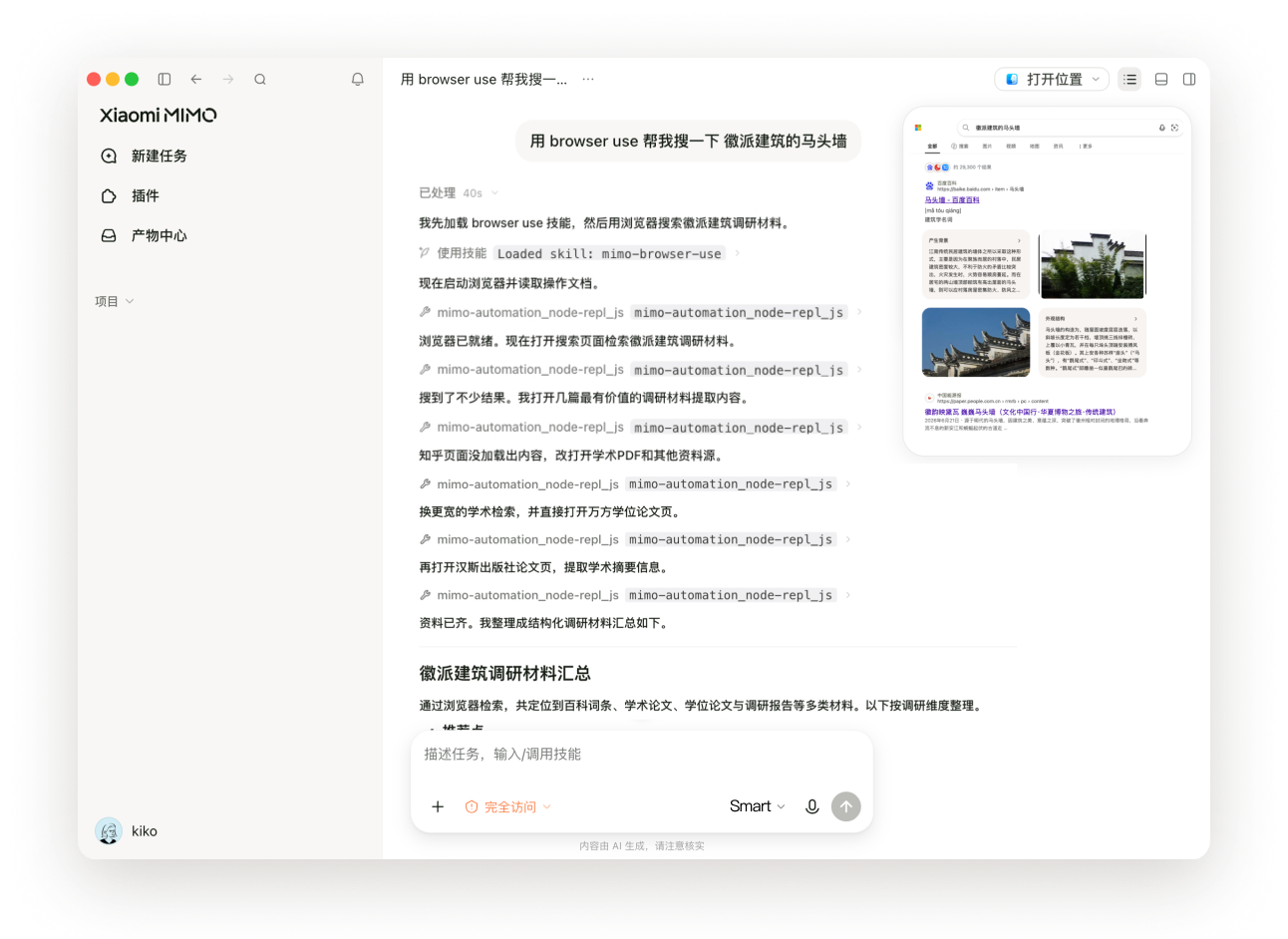
MiMo Desktop can independently control the computer browser, read browsing pages, and perform interactive operations, including opening web pages, retrieving information, filling in forms, and extracting creatives. The browser is not only a source of information but also serves as part of the task execution environment.
Information obtained from the browser can be directly imported into the current task for research, analysis, organization and content creation, maximizing the time saved for users from manual retrieval and cross-app content transfer. When generating web-based outputs, MiMo Desktop also enables users to inspect key interactions via the browser within the same workflow to automatically verify the deliverables.
06 Computer Control: Enter Desktop Environment (Overseas Version Only)
For tasks requiring cross-application collaboration, MiMo Desktop can read screen content, operate the keyboard and mouse to open files, verify data, and transfer information across applications. After the execution of key steps, the system will check the results and make corrections or stop the process when necessary.
For stable and repetitive processes, users can record a complete operation once via the Record & Replay function, and then let MiMo Desktop automatically re-execute it through natural language instructions.
07 Keep the Cost of Long Tasks Under Control
Long tasks not only need to be completed with high quality, but also require strict control over computing costs. MiMo Desktop reduces unnecessary cost expenditures through optimizations in model routing, in-place editing, and context caching mechanisms.
The "Smart" scheduling selects an appropriate model based on task complexity; local editing only processes and regenerates the content that needs modification; the high cache hit optimization minimizes the redundant computation of cached parts to the greatest extent. The combination of these three mechanisms reduces the token consumption caused by model selection, change scope, and redundant context computation respectively.
In practical long-task testing, the cache hit rate can reach up to 99% for the same session and 95% across sessions, helping users maximize control over task costs.
Get an Early Access to the New Model
During the invitation-based testing period, approved applicants can experience two new-generation Xiaomi MiMo model Preview versions for free on a time-limited and quota-limited basis on MiMo Desktop, codenames:
-
MiMo-X-Pro-Preview
-
MiMo-X-Flash-Preview
The MiMo-X series models are optimized for real professional work scenarios, with key coverage including complex task reasoning, multi-Agent collaboration, large-scale programming projects, Office, web design, front-end and Interaction Design, video editing, 3D generation, music generation, computer control, etc.
The MiMo-X series is currently in the preview testing phase, and its performance may change with version iterations. User feedback based on actual tasks will be used for subsequent evaluation and improvement.
How to join the invitation-only test
Visit the following page and submit an application. Once approved, you will be able to download and use MiMo Desktop:
This invitation-only beta will be prioritized for existing users of the Xiaomi MiMo Open Platform.
Closing Remarks
We firmly believe that the significance of AGI lies not only in understanding the world, but more importantly in empowering every individual to create the world.
MiMo Desktop is the very first step for us to step into real-world workflows and help users turn their ideas into high-quality deliverables.
You are welcome to apply to participate in the invitation-only test, and use real tasks to tell us what it is already capable of accomplishing, and which aspects still need improvement.